Whirlpool F28 Error: CCU to MCU Communication Failure
How to troubleshoot Whirlpool F28 washer error code.
Serial communication timeout between Central Control Unit (CCU) and Motor Control Unit (MCU). The main board cannot detect motor tachometer signals.
Probable Causes
Vibration chafing or pin corrosion on serial data communication cable between CCU and MCU.
Blown low-voltage power supply on Motor Control Unit (MCU) printed circuit board.
Faulty serial communication transceiver on Central Control Unit (CCU).
Diagnostic & Testing Steps
- •Washer beeps and displays F28 shortly after pressing start.
- •Motor fails to rotate drum or initiate sensing agitation.
- •Door locks then unlocks repeatedly before error lockout.
Tools & Equipment Required
- ✓Digital Multimeter (Continuity & Voltage)Check pressure switch / transducer wiring harness continuity to Central Control Unit (CCU).
- ✓1/4-inch Nut Driver & Torx T20Remove washer top panel to access pressure switch and CCU board.
- ✓Plastic Syringe & Flexible Hose AdapterGently flush air through pressure switch tube to dislodge soap scum in air trap dome.
- ✓Slip-Joint PliersRelease spring hose clamps on lower air dome chamber for cleaning.
- ✓Small FlashlightInspect clear pressure hose for pinholes, kinks, or soapy water condensation.
Fast Reset Sequence: Whirlpool Control Diagnostic Reset Sequence
Before unmounting panels or beginning diagnostic procedures, attempt this manufacturer reset to clear transient microcomputer lockouts:
- 1.Press Cancel / Drain twice to terminate the locked cycle.
- 2.Disconnect wall power plug or switch off the dedicated breaker for 5 full minutes.
- 3.For electronic diagnostic test mode: with door latched, press any 3 consecutive keys (1-2-3, 1-2-3, 1-2-3) in sequence under 1 second apart.
- 1
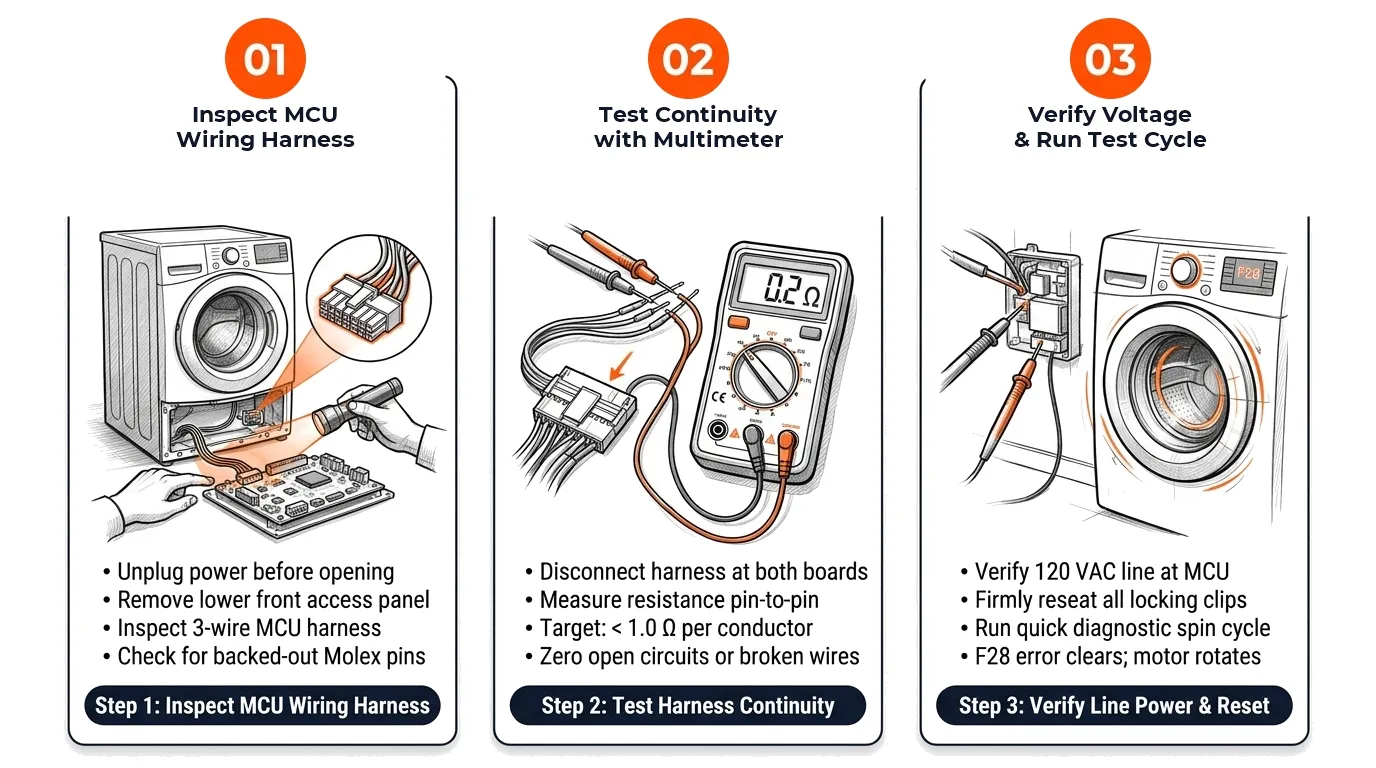
Step 1: Inspect Wiring Harness & Molex Pins
[ ] DoneRemove bottom front panel, inspect 3-wire communication harness leading to MCU for pin backing or chafing.
Verification:Connectors click firmly into place and wire jackets are undamaged. - 2
Step 2: Test Wire Continuity with Multimeter
[ ] DoneUnplug both harness ends and measure resistance on each wire using digital multimeter in ohms mode.
Verification:Each conductor reads less than 1.0 Ω resistance with zero intermittent open circuits. - 3
Step 3: Verify MCU Line Voltage Supply
[ ] DoneCarefully measure incoming AC voltage at MCU power connector with washer plugged in.
Verification:Multimeter confirms 110–120 VAC line power reaching the MCU board.
Repair Solutions
Perform a 5-minute hard power cycle to reset onboard capacitors.
Inspect Molex connector pins at CCU terminal and MCU board for corrosion or loose seating.
Perform continuity test on each individual wire in the communication harness (< 1.0 Ω expected).
Frequently Asked Questions
Can a loose wall outlet plug cause Whirlpool F28?
Yes, voltage drops or loose neutral wiring can corrupt sensitive serial data communication between the CCU and MCU.
How do I identify whether CCU or MCU failed?
If the harness has continuity and MCU receives 120 VAC but its status LED remains unlit, the MCU board is defective.